Creating a campaign in ensun Ads includes four main steps:
Targeting
Design
Customer
Budget
Before creating your campaign, you can use the performance estimation here to evaluate how your ad might perform based on your targeted keywords. If you are satisfied with the estimated performance, you can proceed with creating your campaign.
Run your website through an LLM with the following prompt:
“Based on this website, generate 20–25 high-intent B2B keywords companies would search when looking for this product/service. Avoid generic keywords. Website: [URL]”
Add the keywords one by one.
Try to be as specific as possible to avoid attracting overly generic searches (unless that is your goal).
You can select up to 25 keywords.
Start by defining which searches your ad should appear for and where your targeted audience is located.
See “Tips for selecting keywords” in Step 0.
Add or remove keywords depending on the audience you want to reach.
Define where your audience is located by selecting continents and/or countries.
This allows you to focus your campaign on the markets that are most relevant for your product or service.
In this step, you configure the appearance and messaging of your ad.
Define your key takeaway
Describe what your company does in up to 320 characters and briefly reference the product or service you want to advertise.
Tip: Start the key takeaway with your company name. For example: ensun.io is a leading platform for connecting suppliers with the right leads.
Highlight
Enter a short name or description of the solution (product or service) you want to promote.
Tip: Avoid using only internal product names like “Redmi Note 14” if they are not widely recognized. A clearer description like “Android smartphone” works better because users immediately understand the product category.
Highlight type
Select whether your campaign promotes a Product, Service, or Other.
Highlight description
Describe your solution in up to 180 characters. Focus on:
Your unique selling points (USPs)
What makes your solution the best choice
Important: Both the highlight and the description should be written in clear, full sentences.
Image
Select a high-resolution image that clearly showcases the highlight you want to promote.
Now define the type of companies you want to reach.
Industry
Select or enter the industries your ideal customers belong to.
Example: If you want to reach tire manufacturers, simply enter “tire manufacturers”.
Company size
Choose the employee count range of your target companies, such as startups, mid-sized companies, enterprises,…
Reference customers
You can also add existing customers as references by either entering their company name, or their website URL.
This helps refine the targeting.
The final step includes the campaign setup and pricing selection.
You will need to:
Choose a campaign name (only visible to you and your team)
Enter the target URL where users should land on your website
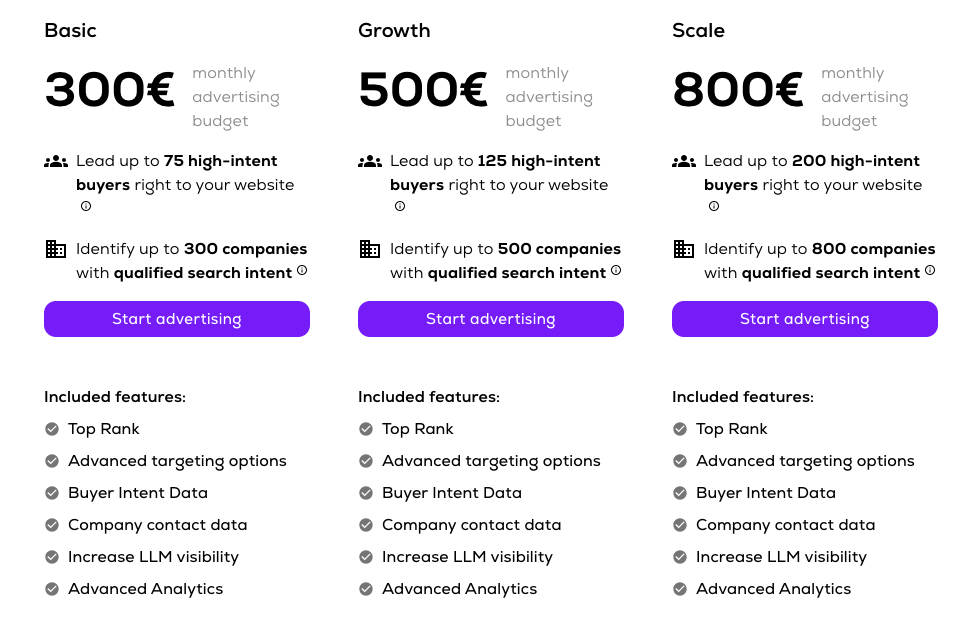
Select a pricing plan
Save as draft or
start your campaign by putting in your credit card information
Tip:
If you’re already using Google Analytics or a similar tool, you can set your target URL as a UTM link. This allows you to track how users from this campaign interact with your website.
Make sure the target link leads to a page that exactly matches what you mention in the campaign, so users find what they expect.
Increased visibility needs the right backup – make sure your landing page is optimized to turn that attention into results. Add a strong hero section with a clear call-to-action on your target page.
There are three predefined pricing options, and you can also set a custom budget based on your needs.
Start your ensun Ads campaign today!
Start advertising